
Sometimes its the little things that annoy me the most. OK, maybe its more often than sometimes.
In today’s episode of annoying things, I was looking for the latest Oracle database and grid infrastructure gold images for Exadata so I can update my databases to Oracle AI Database 26ai (more on that in another post).
As always, I go to the following MOS notes – 888828.1, and 888.1 – to get the desired information.
Which give me the specific patches I need to download. (888828.1 first, followed by 888.1)

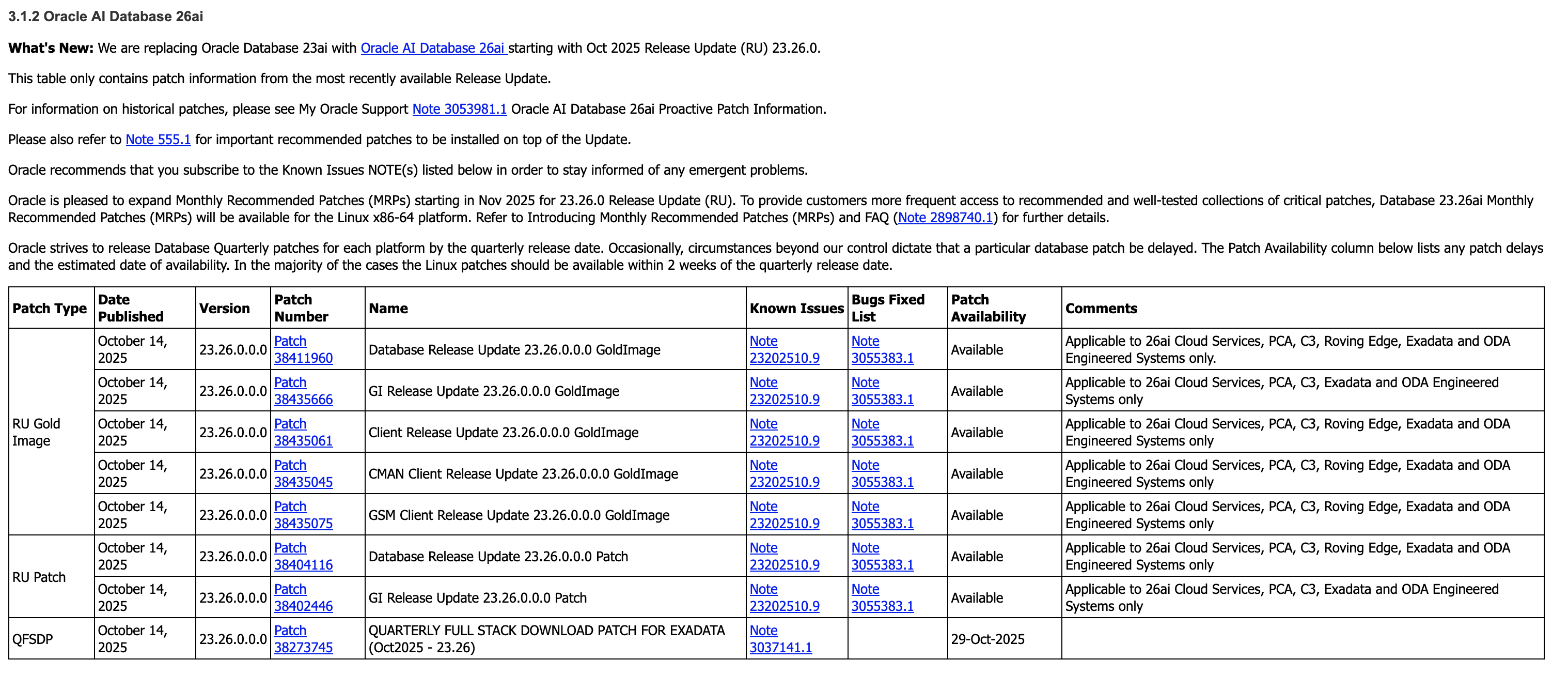
But here’s the thing – I want the Database and GI Gold Image Clone files for Exadata so I can use them with OEDACLI to install and update my VM clusters.
In MOS, to find these you can search for “DB SOFTWARE CLONE” or “‘GI SOFTWARE CLONE” and do some digging to find what you’re looking for.
But the easiest option to find this information is to use OEDA itself.
Firstly, make sure you download the latest OEDA release from https://www.oracle.com/database/technologies/oeda-downloads.html
Then unzip it to a location of your choosing, fire up the Web UI and walk through creating a configuration, or upload and update an existing configuration, which will give you the desired information in the installation report at the end!

Simple right. Sure – but its actually even easier than this.
OEDACLI has a great little feature which gives you this same information, namely the patches you need to download, in two simple commands.
Again, after downloading the latest OEDA release, start oedacli from the command line. You don’t need to provide a configuration file.
./oedacli
Then, use the ‘list requiredfiles’ command and pass in the DB or GI versions you want information about.
oedacli> LIST REQUIREDFILES DBVERSION=23.26.0.0.0

VM_DB_FILES_23.26.0.0.0 : p38455285_2326000DBRU_Linux-x86-64.zip : db-klone-Linux-x86-64-2300026000.zip
VM_DB_KVM_FILES_23.26.0.0.0 : p38455285_2326000DBRU_Linux-x86-64.zip : db-klone-Linux-x86-64-2300026000.zip
BM_DB_FILES_23.26.0.0.0 : V1043785-01.zip
And
oedacli> LIST REQUIREDFILES GIVERSION=23.26.0.0.0
VM_GI_FILES_23.26.0.0.0 : p38455288_2326000GIRU_Linux-x86-64.zip : grid-klone-Linux-x86-64-2300026000.zip
VM_GI_KVM_FILES_23.26.0.0.0 : p38455288_2326000GIRU_Linux-x86-64.zip : grid-klone-Linux-x86-64-2300026000.zip
BM_GI_FILES_23.26.0.0.0 : V1043786-01.zip
So for the DB, I want to grab patch 38455285, and for GI I want patch 38455288.
So what was annoying me about that? My own memory! This neat feature has been around since the around 2017 (if not earlier), but somewhere along the way I forgot about it and started doing things the hard way again…
Oh, and while we still have oedacli running, if you want to know what software versions are supported on your generation of Exadata, the LIST SOFTWAREVERSIONS command is really helpful.
oedacli> list softwareversions where type=X8M
GI Versions for X8M
11.2.0.4.210119
12.1.0.2.220719
12.2.0.1.220118
18.14.0.0.210420
19.29.0.0.251021, 19.28.0.0.250715, 19.27.0.0.250415, 19.26.0.0.250121
23.26.0.0.0, 23.9.0.25.07, 23.8.0.25.04, 23.7.0.25.01
Recommended GI version: 23.26.0.0.0

DB Versions for X8M
11.2.0.4.210119
12.1.0.2.220719
12.2.0.1.220118
18.14.0.0.210420
19.29.0.0.251021, 19.28.0.0.250715, 19.27.0.0.250415, 19.26.0.0.250121
23.26.0.0.0, 23.9.0.25.07, 23.8.0.25.04, 23.7.0.25.01
Recommended DB version: 23.26.0.0.0
Make sure you have the appropriate support in place for any versions earlier than 19c.
And that’s it – the easiest way to get the patch numbers for the Gold Image Clones used by OEDA and Exadata to deploy and update Oracle Database and Grid Infrastructure!
 alexblyth.net
You must be logged in to post a comment.