Tag: autonomous

  • Autoscaling in Oracle Autonomous DB

    Autoscaling for Autonomous Database (Shared or Serverless) was made available in May 2019. So what is it? And how does it work?

    First and foremost, the UI has changed a little as of the time of writing. This seems to be due to the release TODAY for the Dedicated Autonomous Transaction Processing service (more on this in a future post). That said, creating an ADW or ATP is just as easy as it was before, but now you’ll also see the new checkbox as shown in the image below.
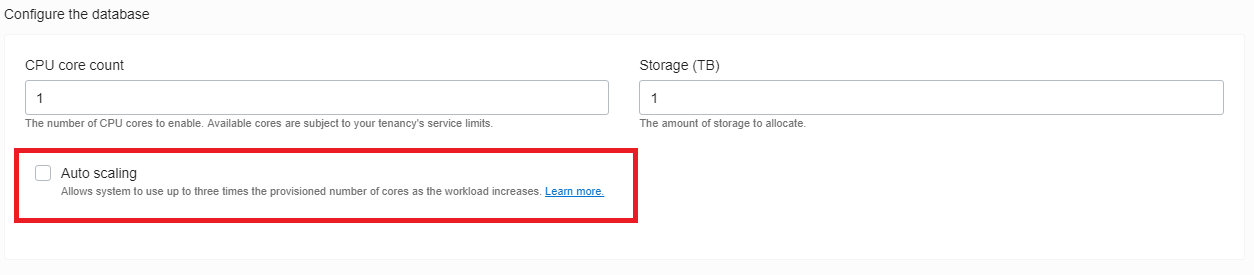
    Create new ADW/ATP dialog

    So as you can see, enabling Autoscaling is as easy as checking this box when you create a new ADW/ATP or, you can come back and modify an existing database using the Scale Up/Down link (or API).
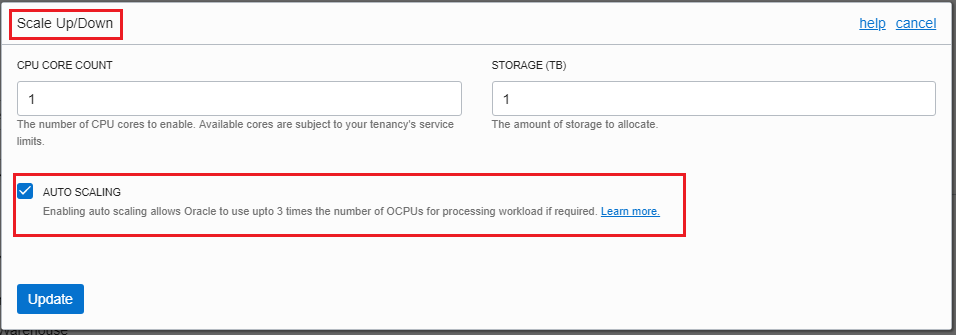
    Scale Up/Down dialog

    But what is the database doing under the hood? Well, if you’ve played with the Autonomous DB platform in the past, you may have poked around the internal views to see how Oracle has configured the service.

    Lets start with definition of what Autoscaling in Autonomous DB means:

    Enabling auto scaling allows an Autonomous Data Warehouse database to use up to three times more CPU and IO resources than the currently specified CPU Core Count (up to a maximum of 128 CPU cores). When auto scaling is enabled, if your workload requires additional CPU and IO resources the database automatically uses the resources without any manual intervention required. (Source – ADW New Features Doc)

    So this means that Oracle will autonomously make upto 3x the CPU and IO resources available for workloads in the database as and when needed.

    Back to the internal views – if you’ve looked into a ADW/ATP that does not have autoscaling enabled, you may have fired off this command in SQL Developer/SQL*Plus:

    show cpu_count

    For non-autoscaling instances, this will be set to the same number as the number of OCPUs you have configured for your ADW/ATP. E.g. – if you have configured 4 OCPUs, cpu_count will be set to 4.

    For instances with Autoscaling enabled, this will be set to the 3x the number of OCPUs you have chosen to configure. E.g. – if you have configured 4 OCPUs, cpu_count will be set to 12.

    So, with Autoscaling enabled, you already have access to 3x the number of OCPUs. The database doesn’t need to monitor workload and make decisions about when it needs to add resources or attempt to understand the best time to remove resources. They are already there.

    BUT, just because you have access to them, doesn’t mean that you are paying for them. With autoscaling enabled, you pay for the configured OCPUs as a base – so 4 in the example above – and for usage between 4 and 12 OCPUs, Oracle takes the average usage above the configured baseline.

    The final point to make is that with Autoscaling enabled, the parallel degree limit for the high and medium services remains set to the number of OCPUs configured, not the 3x value.

    Cheers

    Alex

  • Autonomous Database Clones

    Autonomous Database Clones

    As of today, you can now clone Autonomous Databases – both ADW and ATP – in Oracle Cloud Infrastructure.

    This was an oft requested feature for the service and its great to see that its now available. 

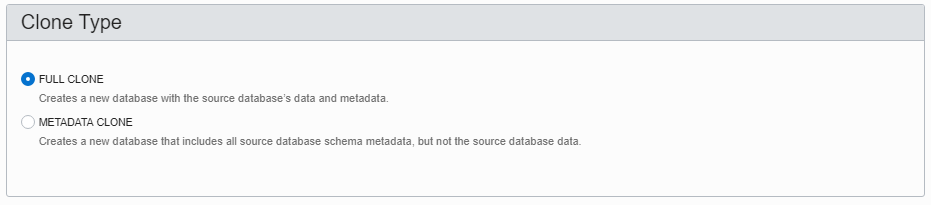
    You have the choice of having a full clone or metadata only clone created.

    • Full clones are a full clone of the PDB underlying the database – users, stored procs, tables, partitions, indexes, table stats, DATA – the works…
    • Metadata clones are as they sound – all the metadata describing the database, objects, tables, users etc – BUT NO DATA.

    To create a clone, you need a previously created ADW or ATP:

    Heres some I prepared earlier

    Next – hover over the ellipsis (three dots) on the right hand side and select “Create Clone”

    Create Clone

    You’ll then be presented with a familiar dialog box to choose the amount of CPU, Storage the database needs, what the new ADMIN password for the clone will be and what your choice in license (Included or Bring Your Own).

    You can also choose the compartment the clone will be created in.

    Most importantly, you get the choice (right up top) of the kind of clone you want – FULL CLONE or METADATA CLONE

    Full or not full, that is the question

    Once you’ve made you choices, click “Create Autonomous Database Clone” and the platform will go ahead and clone your ADW or ATP just as it would were it provisioning a new Autonomous Database.

    When its done, it’ll act and behave just like the source Autonomous Database it was cloned from. You can scale up/down CPU and storage or stop the CPUs all together.

    Bear in mind the clone is not linked to the source database .. Any changes you make to the source database stay in the source database.

    And there you have it – Autonomous Database Clones!

    For more information, check the following doco pages:

    Autonomous Database New Features – Check March 2019

    Clone Autonomous Database

  • Oracle 18c != Autonomous Database, But Autonomous needs 18c

    When Oracle (yes, I work for the big O) announced that it was building out its Autonomous Database Platform – starting with the Autonomous Data Warehouse Cloud (ADWC) – I started hearing a lot of statements that Oracle 18c would be Autonomous in and of itself. This is not the case.

    The very excellent Tim Hall “ranted” (not really) about this late last year after he got an early view of the Autonomous platform at OOW17. Read his view here -> Tim Hall – Oracle Autonomous Database and the Death of the DBA.

    So what is 18c? Its the latest version of the Oracle Database – also known as 12.2.0.2. That is its the 12.2 database with what Oracle used to call a patchset. As of 18c, Oracle has moved a “yearly” release cycle with quarterly release updates and release update revisions in between. I’ll write more on this another time.

    As with releases of Oracle Database over the past 20-25 years (remember that 9i was the “Self Managing , 18c includes, adds and/or enhances a vast array of features that are designed to reduce the amount of time DBAs need to design and build the database and server infrastructure, keep the database up and running, make it perform, and keep it patched and upgraded. Features in this category include Automatic Storage Management, SQL Tuning Sets, SQL Plan Management, Automatic Memory Management, Automatic Data Optimisation and and and…

    The issue with the above is that you had to choose to use almost all of them. Yes, part of the “choice” was that you had to choose to buy the license, such as Advanced Compression to get access to Automatic Data Optimisation, but putting that aside for a minute, you had to choose to use whatever feature might help you in a given situation.

    Oracle Autonomous Database effectively takes the need to choose away from the user, by turning on all the automated features that Oracle have been building into Oracle Database, in favour of providing a standardised database platform that tunes, upgrades, patches and secures itself in an ongoing manner. Add into the mix an autonomous management engine to keep everything on track.

    Oracle has stated that the Autonomous Database services will be available in Oracle Cloud and, over time, on the Cloud @ Customer platforms. 18c Database is the underlying database version for Autonomous.

    18c will, as have past releases, be available for DBAs, devs and anyone else who is interested, to download and install on their own infrastructure. But the parts that make an Autonomous service will be cloud only offerings.

    As Tim put it so succinctly,

    Less time on boring shit. More time on important shit!

    Hear, hear!! Stop doing the stuff you did as a junior DBA, and get stuck into the interesting stuff. Help devs write better SQL, learn features and tools you haven’t needed or didn’t have licenses to use in the past – features like Spatial & Graph, R, Database In-Memory – and apply what you discover to the problems in the context of your business and its unique needs.

    BUT, this doesn’t mean that knowing how to build a database, when to choose to use a feature and when not to is not also still important. You can’t abdicate your responsibility as a consumer to ensure that you are using the right service for the right purpose at the right time. You’ll just have to do less of the grunt work over time.

    In my view, Autonomous Databases are the next evolution of data management platforms and a welcome one. The less process work that needs to be done manually the better. Let’s get back to the interesting shit!