Tag: cloud

  • Create an ExaCS in OCI using the OCI CLI

    I recently got the opportunity to create an Exadata Cloud Service (ExaCS) instance in Oracle Cloud Infrastructure.

    Im not going to go into the details of the network requirements or how to set up the OCI CLI. Details on both of these can be found in the OCI doco


    Once you have the above done, you can then proceed to create an ExaCS. You could do this through the Web Console, but when I was presented with what I assume is a bug in the console, I decided to give the CLI a try.

    Before executing the CLI, you need to create two (2) files:

    • A JSON formatted file that has the create_db_system payload
    • a file referenced in the main file that contains the SSH public key pair(s) you want to associate with the ExaCS instance

    An example (based off the file I used) and explanation follows – you can get the json file from here:

    (You can also get a possibly easier to read version of the below at https://gist.github.com/alexblyth/acb4d088c480e603646629bb4c4fbedc)

    Parameter Example Value Explaination
    adminPassword Complex#$@Password123 Admin password for both the database
    availabilityDomain rMTbAP-MELBOURNE-1-AD-1 Availability Domain for the ExaCS. I happen to be using Melbourne AU
    autoBackupEnabled true Automatic backups enabled?
    backupSubnetId ocid1.subnet.oc1.ap-melbourne-1.aaaaaaaasgzvm5bpgch44qtplg52cpseyg2r4ziaaaaaaaaaaaaaaaaerdsq ExaCS needs a separate backup network. Enter the OCID for this network here
    clusterName clustername1 The name of the RAC cluster
    compartmentId ocid1.compartment.oc1..aaaaaaaasl3uge72u5xemtqwrpzo2t3tfjawv4k33haaaaaaaaaaaaaaaaja Compartment OCID that you wan the ExaCS in
    cpuCoreCount 8 Initial OCPUs allocated across the ExaCS nodes
    databaseEdition ENTERPRISE_EDITION_EXTREME_PERFORMANCE ENTERPRISE_EDITION_EXTREME_PERFORMANCE is the only option if you're creating an ExaCS
    dbName dbname Database name for initial DB
    dbVersion LATEST Database (and therefore ASM/GI) version. I suggest you go with latest. You can then create new DB homes of earlier versions (back to 11.2). This gives you the greatest flexibility.
    dbWorkload OLTP Is the DB an OLTP or DSS geared DB?
    diskRedundancy HIGH HIGH ASM disk redundnacy is the only option for ExaCS
    displayName console_display_name OCI Console Display Name
    domain client_subnet_domain The domain name for the ExaCS Client network. Used to fully qualify host and SCAN addresses
    hostname hostname_prefix Hostname prefix – ie 1-8 will be appended depending on the ExaCS Shape
    licenseModel BRING_YOUR_OWN_LICENSE Are you using existing licenses or are you going LICENSE_INCLUDED?
    nodeCount 0 For ExaCS this will be 0 – the number of nodes is determined by the shape.
    pdbName pdb1 The initial PDB name
    shape Exadata.Base.48 This is the ExaCS Shape – eg Exadata.Full3.400 or Exadata.Quarter2.92
    sparseDiskgroup true Do you want to allocate some space to create/use sparse clones?
    sshAuthorizedKeysFile ./keys.txt Reference to a file with the SSH Public keys you want added to the compute nodes
    storageManagement ASM ASM is the only option for ExaCS
    subnetId ocid1.subnet.oc1.ap-melbourne-1.aaaaaaaacrvjzuook7wdxqv5bvfnfbr2ksp7aaaaaaaaaaaaaaaanlmcuxcq This is the client network – ie where actual DB client connections will be coming to
    timeZone Australia/Melbourne Finally, the timezone you want the ExaCS instance to be created with – My ExaCS is in Melbourne AU hence Austraia/Melbourne
    Explaination of JSON payload

    Once you’ve updated the json file, and created a file for your ssh keys, you can run the following from your OS command line

    oci db system launch --from-json file://create_exacs_ocicli.json

    ExaCS will take a while to create – its doing a fair amount of work – so at this point, grab a coffee (or dinner & a movie depending on the time of day) and keep an eye on the progress through the OCI Console.
  • Create an Oracle Database System in Oracle Cloud Infrastructure

    This guide walks you through creating an Oracle 18c Database System in Oracle Cloud Infrastructure (OCI).

    Note: I am assuming that you have already created all the necessary networking components in your OCI tenancy.


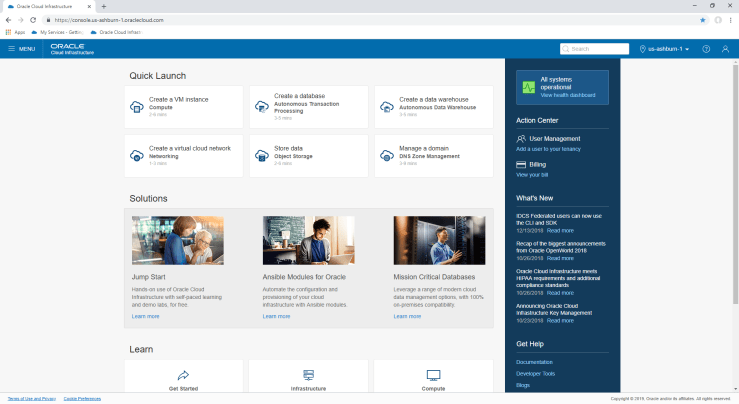
    OCI Home Page

    Starting from the OCI Home page, hit the Menu link in the top left-hand corner, and the select “Bare Metal, VM, and Exadata” under the Database heading.

    Check you’re in the right compartment

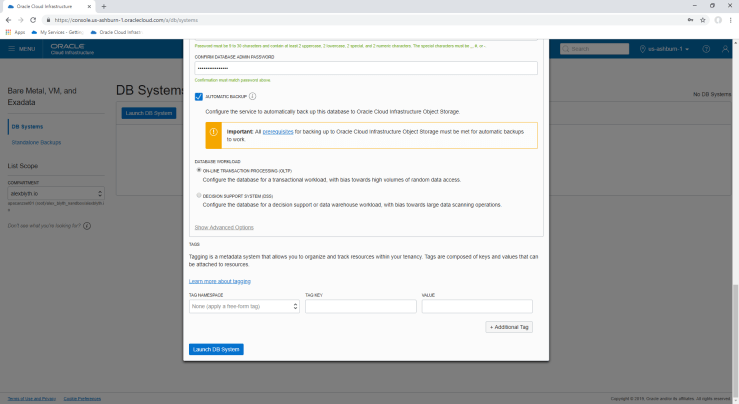
    Hit the blue “Launch DB System” button and fill in the form and press “Launch DB System” at the bottom

    After you hit “Launch DB System”, the console will report the system is provisioning

    Database system being provisioned

    Time to grab a cuppa or lunch and leave this to run for a while. You’ll know when its done when the orange box with “DBS” in it goes a lovely green colour.

    And you’re done. You can now ssh to the VM and start using the database.

    To connect applications, SQL Developer etc, you’ll have to add port 1521 to the subnet Security List the Database System was provisioned in. Port 1521 is already open on the VM firewall.

  • Oracle Database 18c Available

    A quick note to say that Oracle Database 18c is now available on Oracle Cloud and Engineered Systems.

    Please read Dom Giles overview post of 18c at: https://blogs.oracle.com/database/oracle-database-18c-:-now-available-on-the-oracle-cloud-and-oracle-engineered-systems

    Dom covers some of the key features introduced or improved in this release.

    In particular, there are some interesting improvements that I anticipate the Autonomous Database Services to use heavily under the covers. These include the Zero Impact Patching for Grid Infrastructure, Online PDB relocate – including connection redirection, improvements to patching Java in the database (OJVM) and more.

    The 18c New Features Guide is a great place to start getting more detail.